Sample Orders Prepared
High-volume sample orders are prepared in Excel so the automation has a structured queue to process instead of relying on manual SAP work.

A high-volume SAP approval automation where Excel controlled the queue, an RPA bot executed the work, and users received the result back without repeating the transaction manually.
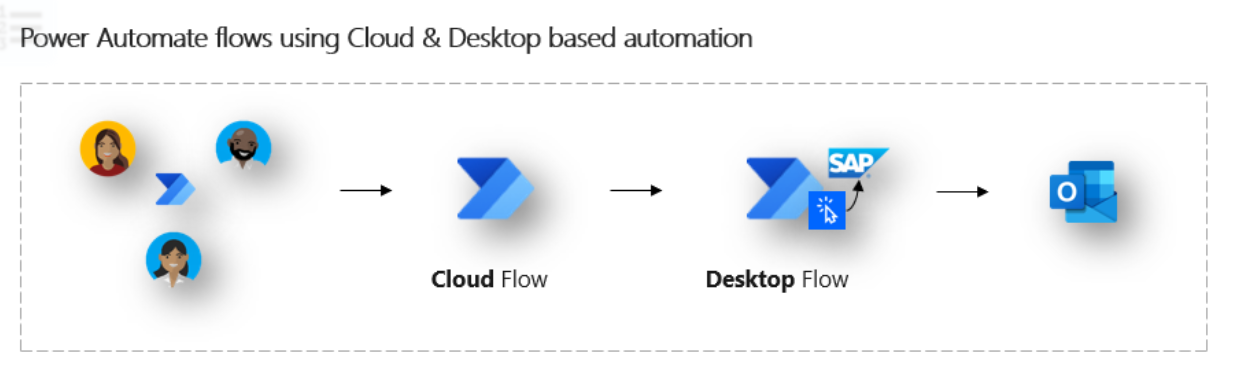
The flow starts from user-side and cloud-side automation, then hands execution to a desktop bot that performs the SAP work and pushes the result back through messaging.
High-volume sample orders are prepared in Excel so the automation has a structured queue to process instead of relying on manual SAP work.
The file is checked for approval-ready records, required data, and the correct batch scope before the bot starts execution.
The bot signs into SAP and repeats the approval steps that a user previously had to execute order by order.
Orders that satisfy the expected conditions continue through automated SAP actions while exceptions are left for controlled review.
The automation writes outcomes back to the tracking layer and sends result notifications so users can see what succeeded and what needs follow-up.
The team moves away from repetitive manual approval work and focuses on exceptions, control, and throughput.
This automation case focused on sample-order approvals that were still being handled manually inside SAP. Each order could consume around 30 minutes of user time, and the workload repeated at high weekly volume, creating an obvious operational bottleneck.
The solution used Excel as the intake and control layer for approval-ready records. An RPA bot then opened SAP, executed the approval actions that a user would normally perform, and wrote the outcome back so the operating team could track results without logging into every transaction manually.
This was not just a simple script. The automation had to bridge business input, a control file, SAP execution, and result reporting. That meant treating Excel as an operational queue, using the bot as an execution worker, and keeping enough structure around outputs so business users could trust the run.
The main gain was throughput. Work that previously consumed about 30 minutes per order moved into a repeatable automation path, which is a significant shift when the weekly volume reaches thousands of orders. The team could then spend more time on exception handling and less time on repetitive SAP actions.
This case shows practical ERP-side automation: identifying a high-friction approval step, designing a control layer around it, letting RPA execute the repetitive SAP work, and returning outcomes back to the users in a usable way.